Features and support
See how OLLS supports your daily operations
Explore OLLS through real product screens and example workflows, with channel and door-lock requirements and beta features clearly noted.

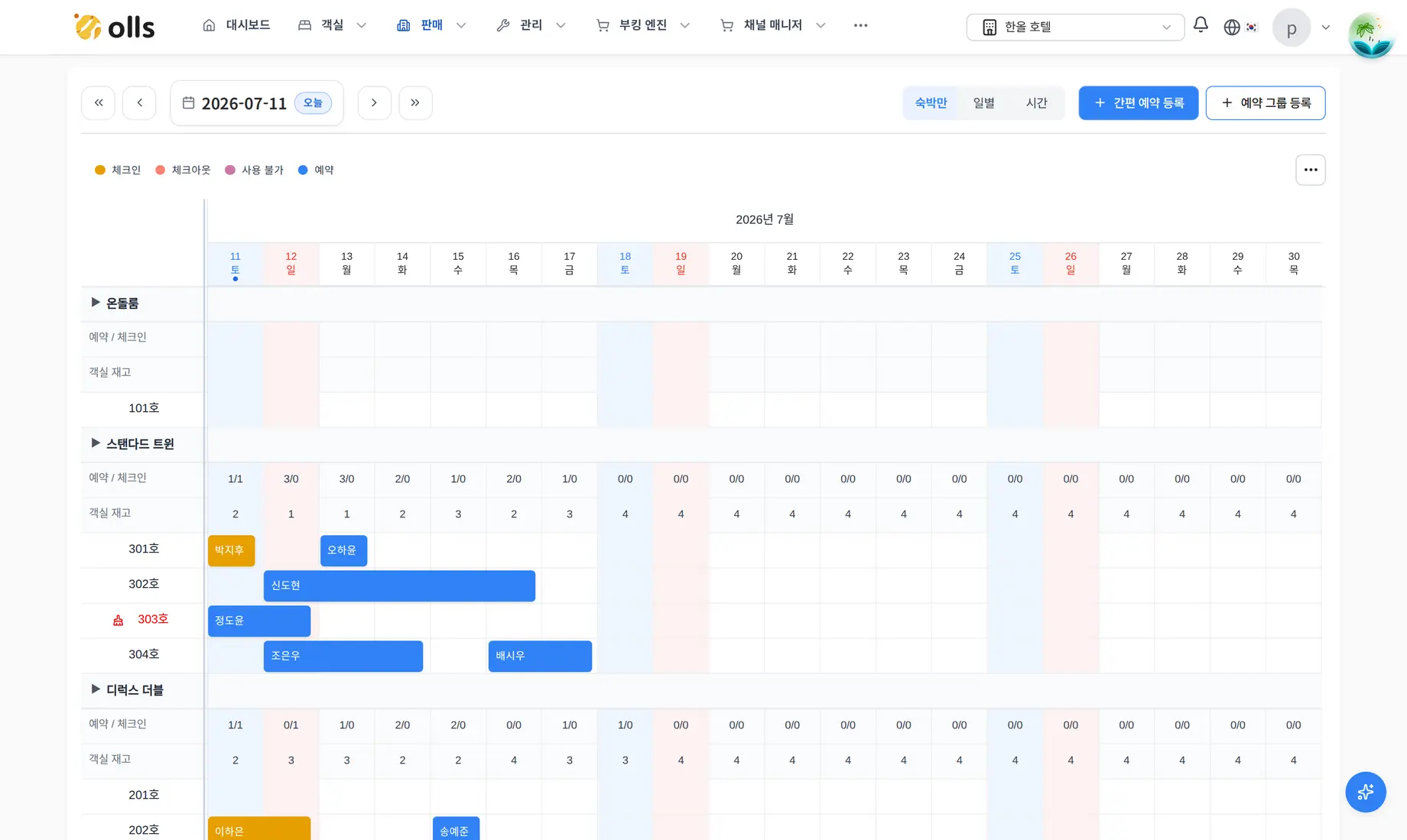
Actual product screen · Reservation calendar
Actual product screen with demo data. The interface is in Korean.
Enlarge screenReview room reservations and their change history
View, create and update reservations by room and date in the calendar. Open reservation details to review guest, sales and payment information together.
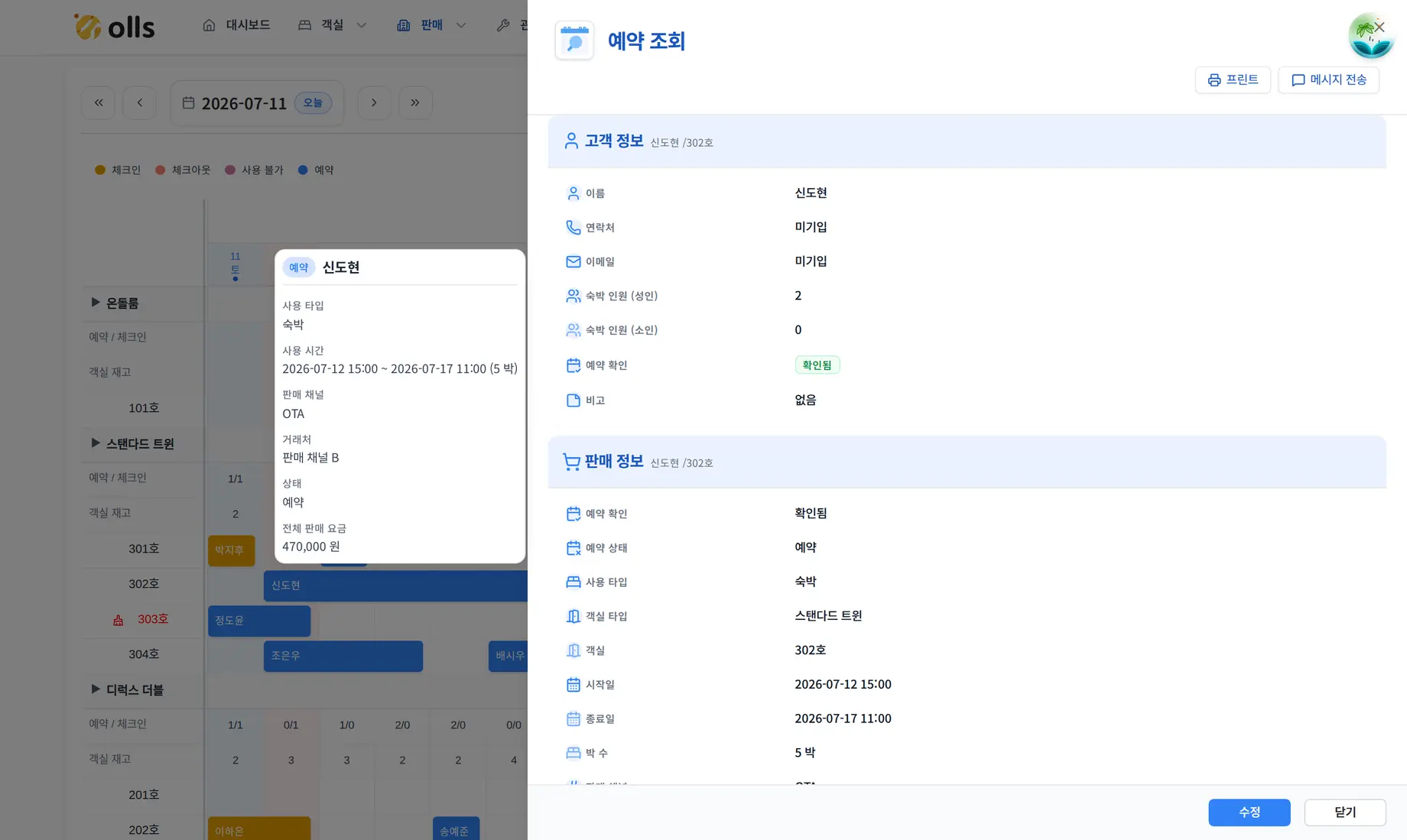
Actual product screen · Reservation details
Actual product screen with demo data. The interface is in Korean.
Enlarge screenManage the reservation calendar, booking details and a direct booking route.
- Reservation calendar
- View schedules for overnight, daily and hourly stays
- Create and update bookings
- Move rooms, change stay dates and check availability
- Reservation details
- Review guest, sales and payment details and change history
- Group bookings
- Review bookings and process arrivals and departures by group
- Direct bookings
- Offer direct reservations through your property’s booking link
Check room status and the next cleaning task
Review room status on the board and see required tasks in the cleaning list. Set periods when rooms are unavailable for repairs or other reasons.
Support for issuing, changing and revoking door-lock codes depends on the model and installation.
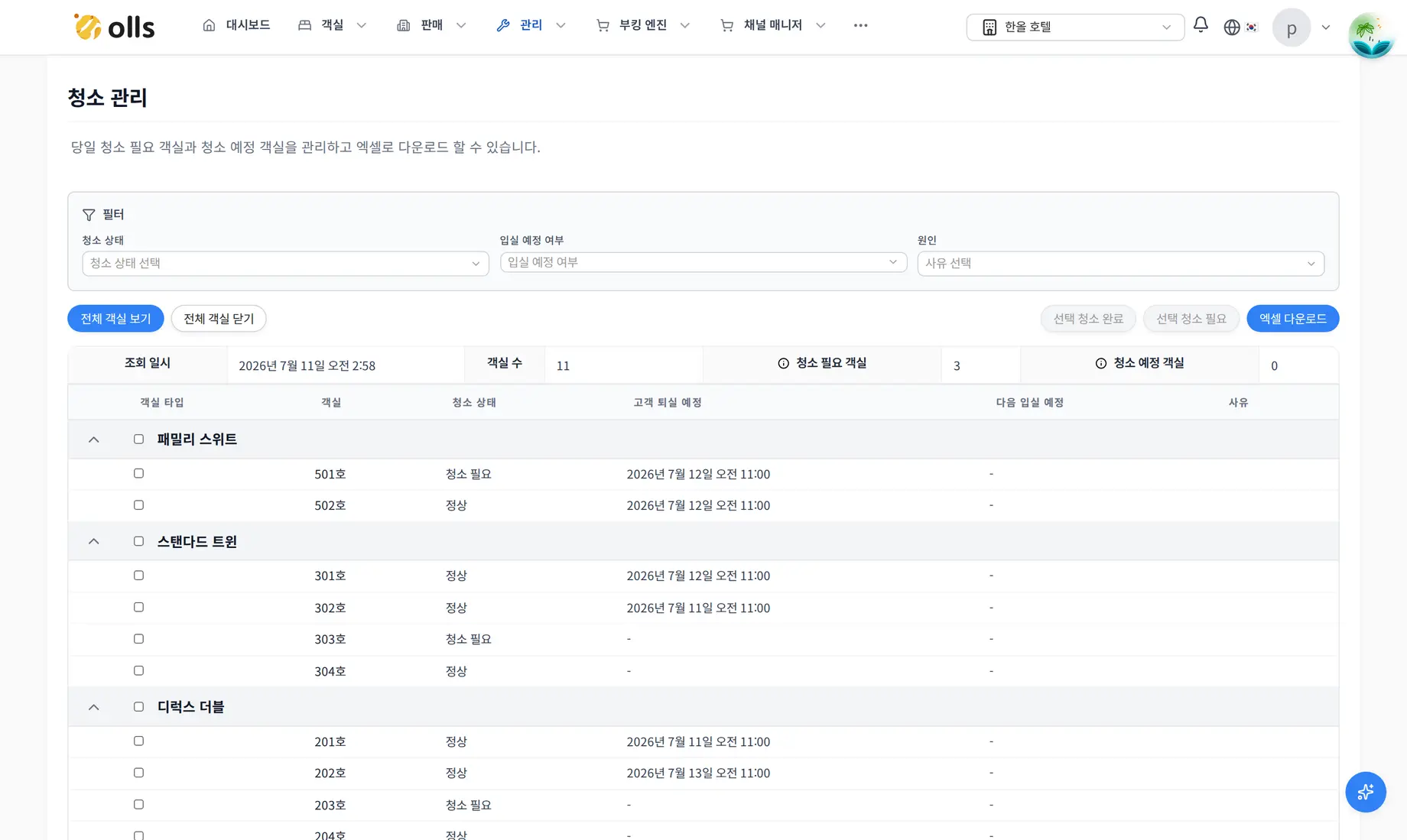
Actual product screen · Cleaning management
Actual product screen with demo data. The interface is in Korean.
Enlarge screenManage room status, cleaning tasks and periods when rooms are unavailable for sale.
- Room status
- Review vacant, occupied and cleaning-required rooms
- Cleaning tasks
- Review cleaning instructions following departures and room moves
- Cleaning updates
- Select rooms and update their cleaning status together
- Unavailable rooms
- Set periods when rooms cannot be sold
- Room inventory
- Review room inventory and sales by date
Manage channel rates and inventory in one place
Review and edit daily rates and room inventory in a grid. Manage product and rate-plan connections and sales closures for connected channels.
OLLS handles channel connection setup and contract configuration. Share the channels you use so we can check availability and the scope of integration.
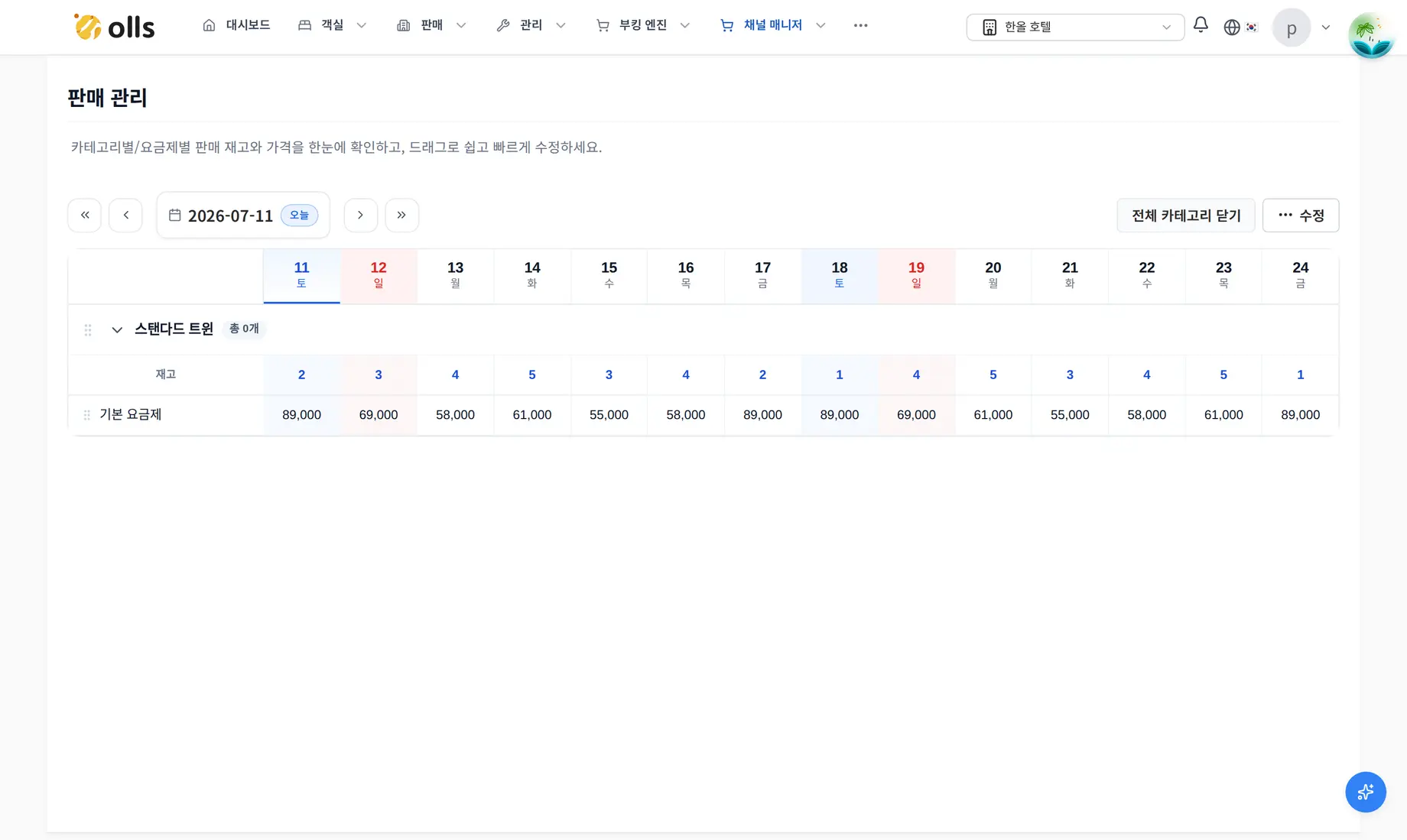
Actual product screen · Sales rates and inventory
Actual product screen with demo data. The interface is in Korean.
Enlarge screenManage rates, room inventory and sales settings for connected sales channels.
- Rate management
- Edit rates for selected periods, weekdays or dates
- Inventory management
- Review and edit daily room inventory
- Sales closures
- Close or reopen sales by rate plan
- Products and rate plans
- Manage links between channel products and property rate plans
- Connection setup
- OLLS checks integration requirements and contract settings
Keep guest service moving from booking to arrival
Send reservation confirmation and cancellation messages, and offer web self check-in. Review delivery results in the message history. Scheduled welcome and checkout messages are in beta.
Support for issuing, changing and revoking door-lock codes depends on the model and installation. Check integration requirements before adoption.
Example workflow
Review the booking
Check the reservation dates and guest information.
Send guidance
Send confirmation or cancellation messages and review delivery results.
Review check-in
Check arrival status and share door-lock codes where the integration supports it.
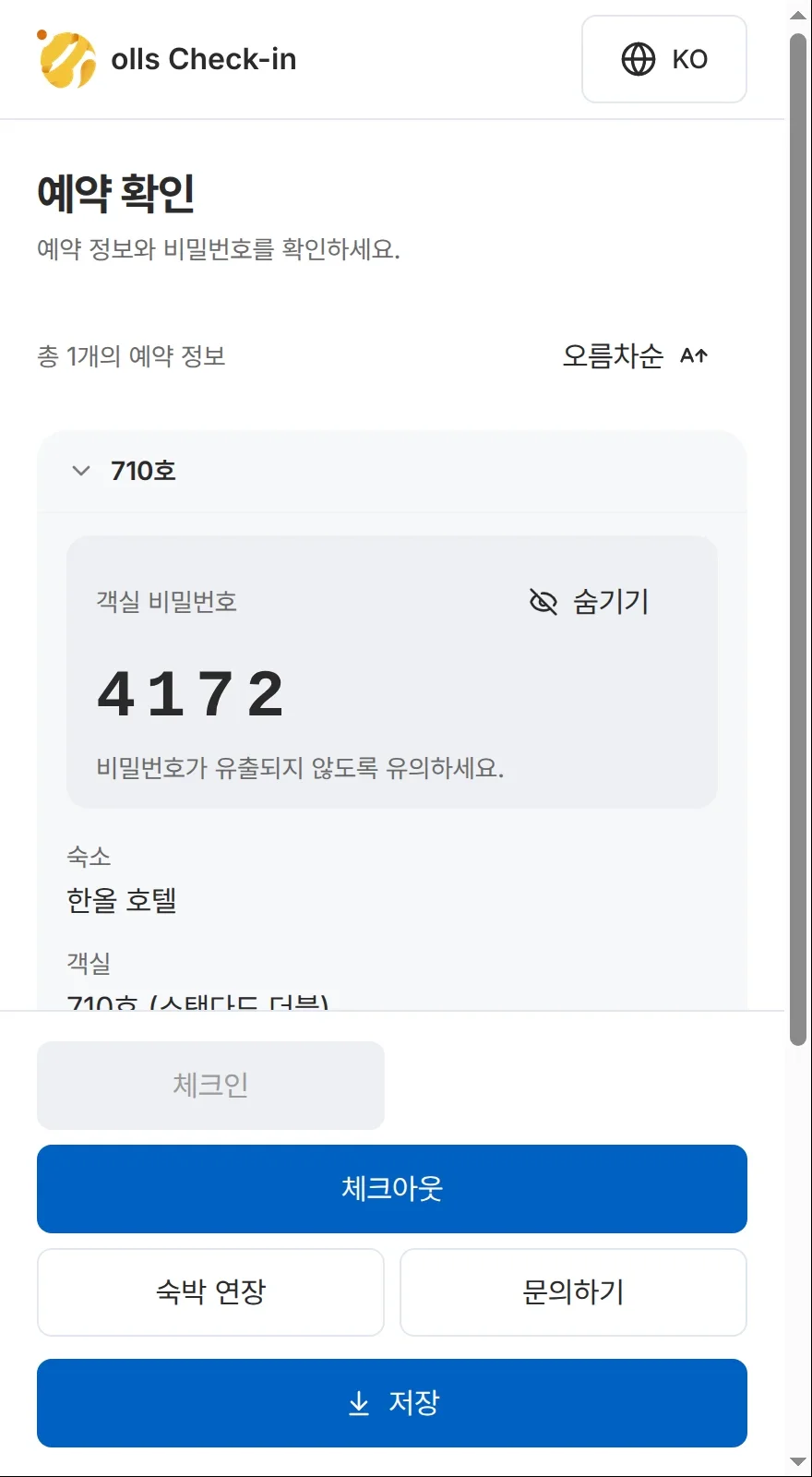
Agree to the required items and sign in the guest view to complete check-in, then review the access code.
Manage reservation messages, web self check-in and message delivery results.
- Self check-in
- Let guests check in on the web
- Confirmation and cancellation
- Send messages based on reservation status
- Scheduled messagesBeta
- Schedule welcome and checkout messages
- Message templates
- Manage messages using property and reservation information
- Delivery results
- Review delivery success and failure for each recipient
Review contract-based settlement and keep a clear record
Apply contractual allocation rules and fees to settlement. Preview calculations before confirmation, then review settlement history and reports.
We review your contract structure and settlement items before advising on a suitable setup.
Example workflow
Review the rules
Check contractual allocation rules, fees and costs.
Review calculations
Preview settlement results and identify items requiring adjustment.
Confirm and report
Confirm the reviewed settlement and access its history and reports.
Apply contractual allocations and fees, then manage previews, confirmation and reports.
- Contractual allocation
- Set revenue allocation rules for the contract structure
- Fees and costs
- Include channel fees, operating costs and other settlement items
- Settlement preview
- Review calculations and adjustments before confirmation
- Confirmation and history
- Confirm settlement and review past records
- Settlement reports
- Review reports for operators, owners and other recipients
Manage staff access across your properties
Invite staff and set access for their roles. Switch between properties and use the operations interface in Korean, English or Japanese.
This website is available in Korean, English and Chinese; the product’s operations interface supports a different set of languages.
Manage staff permissions, multiple properties and interface languages.
- Staff permissions
- Set access according to roles and responsibilities
- Staff invitations
- Invite team members by email
- Multiple properties
- Switch properties and manage access for each one
- Interface languages
- Korean, English and Japanese
- Operational alerts
- Review alerts that need attention, including overlapping bookings
Discuss features and settings for your operations during consultation. Tell us which tasks you want to explore so we can show you the relevant screens.
Request a consultationQuestions about features and support
Can the setup match the features my property needs?
We can discuss a setup based on your operations and required tasks. Available configurations and contract terms are confirmed during consultation.
Which guest messages can be automated?
Reservation confirmation and cancellation messages are supported, with delivery results available for review. Scheduled welcome and checkout messages are in beta.
Does self check-in require a door-lock connection?
Web self check-in is supported. If you also want door-lock integration, the model and installation need checking. Support for issuing, changing and revoking codes depends on the integration.
Which languages can staff use?
The product’s operations interface supports Korean, English and Japanese. This website is available in Korean, English and Chinese.
Can my property accept direct bookings?
The direct booking engine lets you offer reservations through your property’s booking link. Check the required settings and terms during consultation.
Can settlement follow our contracts?
You can apply contractual allocation rules, fees and costs, and preview calculations. After confirmation, review settlement history and reports for each recipient. We advise on the setup after reviewing the contract structure.
Can staff work across multiple properties?
You can switch between properties and set staff access. Tell us which properties and staff roles you need to include during consultation.
Feature consultation · Demo
Tell us what you need, and we’ll walk you through it
Leave the features you want to review and details of your current channels and door locks. We’ll discuss support and adoption requirements together.